AI/ML
Skills vs MCP Servers: The Hidden Token Cost of Claude Code Extensions
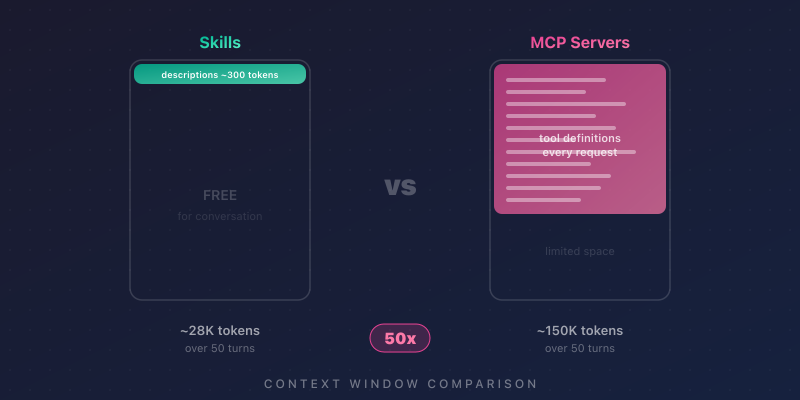
MCP servers consume up to 50x more context than skills. Here's how each loads into memory, what it costs, and when to …
Claude Code can be made much safer, but only if you understand what each control is actually doing.
A lot of teams get confused because the names sound similar:
CLAUDE.mdThey are not the same thing.
A simple way to think about them is this:
CLAUDE.md tells Claude what you want it to doIf you only remember one thing from this article, remember this:
CLAUDE.mdis guidance. Permissions, sandboxing, hooks, and managed settings are enforcement.
That is the difference between “please behave safely” and “this action is blocked.”
The biggest mistake is treating CLAUDE.md as if it were a security control.
It is useful, but it is not a hard boundary.
For example, you could write this in CLAUDE.md:
Never read .env files. Never use curl. Never edit files outside this project.
That may influence Claude’s behavior, but it is still just an instruction.
If you actually want to enforce those restrictions, you need the real controls:
Imagine telling an intern:
“Please do not open the finance folder.”
That is like CLAUDE.md.
Now imagine locking the finance folder, disabling copy access, and requiring manager approval to enter.
That is what real enforcement looks like.
Permissions are the first layer of control.
They decide which Claude Code tools are allowed to run.
For example, if you deny this:
"Read(./.env)"
Claude’s built-in file-reading tools should not be allowed to read that file.
That is useful, but it is not the whole story.
If Bash is available, a shell command could still try this:
cat .env
That is why permissions alone are not enough in a sensitive environment.
Permissions control Claude Code tools such as reading files, editing files, running Bash, or fetching URLs.
Permissions do not magically create an operating-system boundary. If Bash is allowed and not properly sandboxed, the OS may still allow a subprocess to try something dangerous.
Think of permissions as the front desk in an office.
They can say:
That is useful.
But if there is an open back door, the front desk is not enough.
That “back door” is why sandboxing matters.
This is one of the easiest places to confuse readers, so let’s make it explicit.
A permission mode sets the overall approval behavior for the session.
Examples of modes include:
defaultacceptEditsplanautodontAskbypassPermissionsA permission rule applies to a specific tool or pattern.
Examples of rule arrays are:
allowdenyaskSo:
dontAsk is a modeask is a rule type, not a modeThink of it like airport security.
That is why these two lines do different jobs:
"defaultMode": "dontAsk"
and
"deny": ["Read(./.env)"]
The first changes the overall approval style. The second blocks one specific kind of action.
A strong baseline should do four things:
Here is a clean baseline configuration:
{
  "$schema": "https://json.schemastore.org/claude-code-settings.json",
  "permissions": {
    "defaultMode": "dontAsk",
    "deny": [
      "Read(./.env)",
      "Read(./.env.*)",
      "Read(~/.aws/credentials)",
      "Read(~/.ssh/**)",
      "Bash(curl *)",
      "Bash(wget *)",
      "Bash(rm -rf *)"
    ]
  },
  "sandbox": {
    "enabled": true,
    "failIfUnavailable": true,
    "autoAllowBashIfSandboxed": true,
    "allowUnsandboxedCommands": false,
    "excludedCommands": ["docker *"],
    "filesystem": {
      "denyRead": ["~/.aws/credentials", "~/.ssh"],
      "denyWrite": ["/etc", "/usr", "~/.bashrc", "~/.zshrc"],
      "allowRead": ["."]
    },
    "network": {
      "allowedDomains": ["github.com", "*.npmjs.org", "registry.yarnpkg.com"]
    }
  }
}
This config says:
Without this baseline, Claude might try to:
.envcurl anywhereWith this baseline, those actions are either denied directly or constrained by sandbox policy.
That is the difference between “probably safe” and “safer by design.”
Many readers understand one of these layers, but not the relationship between them.
Here is the clearest way to explain it:
You usually want both.
Suppose you block this:
"Read(./.env)"
Good.
That stops Claude’s built-in file-reading tool from opening .env.
But what if Bash tries this?
cat .env
Now the file tool restriction is not enough by itself.
That is where sandboxing comes in.
So a good explanation for readers is:
Permission rules stop Claude tools from asking for dangerous actions. Sandboxing stops Bash from doing dangerous things even if Bash is invoked.
That sentence is much easier to remember than a long abstract explanation.
A common mistake is to write a Bash rule that looks strict and then trust it too much.
For example:
"Bash(curl https://example.com/*)"
That looks safe at first glance.
But Bash matching is not a perfect security boundary. Flags, variables, wrappers, redirects, or alternative command structures can make string-based matching weaker than it appears.
A reader might think this rule means:
“Only
curltoexample.comis allowed.”
But in practice, string matching can be trickier than that. A command can be restructured in ways that are not obvious if you rely only on pattern matching.
Use Bash rules as one filter, not the only one.
A stronger setup is:
In plain English:
Do not trust a single text pattern to carry your whole security model.
Sandboxing is one of the most valuable protections in Claude Code because it creates a real boundary around Bash and its child processes.
But you should not describe it like this:
That language is too absolute.
A much better sentence is:
Sandboxing materially reduces risk, but it does not eliminate risk.
Imagine a workshop with locked tool cabinets.
That is much safer than leaving every dangerous tool on the table.
But if you still leave the windows open, give out master keys, and let people walk in and out freely, the workshop is not “perfectly secure.”
That is how sandboxing should be described: a major protection, not a magic shield.
autoAllowBashIfSandboxedThis setting is easy to misunderstand.
When autoAllowBashIfSandboxed is enabled, sandboxed Bash commands can run without the usual approval prompt. This behavior works independently of your overall permission mode.
That does not automatically mean the system is unsafe.
It means the protection is coming from the sandbox boundary rather than from a prompt.
Without autoAllowBashIfSandboxed:
With autoAllowBashIfSandboxed:
So the safety question becomes:
“How strong is my sandbox?”
not just:
“Did I see a prompt?”
That is an important mindset shift.
Permissions are static. Hooks are dynamic.
That is why hooks are so useful.
Hooks let you inspect an action at runtime and decide what should happen next. Claude Code supports multiple hook events, including PreToolUse, PostToolUse, SessionStart, UserPromptSubmit, and PermissionRequest.
For security policy, PreToolUse is often the most important one because it lets you check a tool call before it runs.
Suppose your rule is:
Claude may edit files inside this repo, but not outside it.
A static deny rule may be awkward here, especially if the path changes.
A hook can inspect the exact path at runtime and decide.
That is much more flexible.
Here is a safer example:
#!/usr/bin/env bash
set -euo pipefail

input="$(cat)"
file_path="$(jq -r '.tool_input.file_path // empty' <<<"$input")"
project_dir="${CLAUDE_PROJECT_DIR:?}"

[[ -z "$file_path" ]] && exit 0

target="$(realpath -m "$project_dir/$file_path")"
root="$(realpath "$project_dir")"

case "$target" in
  "$root" | "$root"/*)
    exit 0
    ;;
  *)
    jq -n '{
      hookSpecificOutput: {
        hookEventName: "PreToolUse",
        permissionDecision: "deny",
        permissionDecisionReason: "Writes outside the project root are blocked"
      }
    }'
    exit 0
    ;;
esac
It checks where Claude is trying to write.
A weak script might just look for whether the path “starts with” the project directory.
That can be brittle.
This hook is better because it normalizes the path first.
A bad path check might be fooled by things like:
../outside.txtA stronger hook resolves the real path first and then decides.
That is the kind of example that makes the benefit obvious to readers.
Hooks are powerful, but they are also privileged.
If your hook runs with your full user permissions, then a badly written hook can create a new problem instead of solving one.
A hook is like a security guard with a master key.
That is useful only if the guard follows good procedure.
A careless guard can make the building less safe, not more safe.
That is exactly how readers should think about hooks.
MCP is another place where articles often become vague.
The safest explanation is:
So you should not assume that Bash sandboxing is what governs MCP behavior.
If you sandbox Bash, that helps when Claude runs shell commands.
But an MCP server is not just “Bash in disguise.”
So the correct reader takeaway is:
Control MCP with permissions and managed MCP policy, not by assuming the Bash sandbox covers it.
That is clearer and less misleading.
For a solo developer, local settings may be enough.
For a company, they usually are not.
If a user can simply override the controls, then the policy is not really policy.
That is why managed settings matter in enterprise deployments.
Managed-only controls can prevent local settings from weakening centrally defined rules. Examples include:
allowManagedPermissionRulesOnlyallowManagedHooksOnlyallowManagedMcpServersOnlyImagine a company says:
“Nobody may connect unapproved MCP servers.”
If each user can ignore that locally, then the rule is only a suggestion.
Managed settings are what turn that suggestion into enforcement.
That is why this layer matters so much in real deployments.
One of the fastest ways to weaken a security article is to overstate what a control does.
Avoid phrases like:
Those phrases usually collapse under edge cases.
A stronger writing style is:
Compare these two sentences:
Weak:
Enabling sandboxing makes Claude Code secure.
Better:
Enabling sandboxing significantly reduces risk for Bash operations, especially when combined with tight filesystem and network restrictions.
The second sentence is more precise, more credible, and more useful.
If your reader is confused, give them this checklist:
Use permission denies.
Example:
"deny": ["Read(./.env)", "Read(~/.ssh/**)"]
Use sandboxing.
Example:
/etc~/.sshUse hooks.
Example:
Use managed settings.
Example:
That kind of summary helps readers connect the tool to the job.
If you are locking down Claude Code, think in layers.
Do not rely on prompts when you need policy. Do not rely on model instructions when you need enforcement. Do not rely on string matching when you need isolation. And do not rely on local preference when you need enterprise control.
Use:
That is the clearest path to a safer Claude Code deployment.
CLAUDE.md documentation: https://code.claude.com/docs/en/memoryQuestions or feedback? Reach out on LinkedIn